IP Cameras
Smarter Security with IP Cameras Tailored to Your Space
Easy to view from anywhere
IP cameras, also known as Internet Protocol cameras or network cameras, transmit video through a wired or wireless network. Unlike traditional analog CCTV cameras, IP cameras can integrate with your existing network infrastructure and offer flexible options for recording, viewing, and managing surveillance footage.
HTC Connection evaluates your facility, identifies important coverage areas, and helps you select the cameras, recording equipment, cabling, and features that fit your business.
Depending on the equipment selected, an IP camera system may provide:
- High-definition or 4K video
- Live remote viewing
- Mobile and computer access
- Night vision and low-light imaging
- Motion detection
- Human and vehicle detection
- Real-time alerts
- Digital zoom
- Pan, tilt, and zoom capabilities
- Local or network video storage
- Power over Ethernet
- Multi-location camera management
- Integration with other security systems
Benefits of Commercial IP Camera Systems
A professionally designed video surveillance system can help businesses monitor activity, review incidents, oversee multiple areas, and maintain greater visibility across their property.
While cameras cannot guarantee that an incident will not occur, they can provide valuable visibility and recorded information when properly placed and maintained.
Benefits may include:
- Monitoring entrances and exits
- Viewing activity remotely
- Reviewing recorded video after an incident
- Observing customer and employee areas
- Monitoring restricted or high-value locations
- Improving visibility around parking areas
- Managing cameras across multiple locations
- Documenting deliveries and facility access
- Receiving alerts when certain activity is detected
- Providing greater awareness outside normal business hours

IP Camera Systems Tailored to Your Property
Every building has different surveillance needs. Camera locations that work for a small office may not provide sufficient coverage for a warehouse, retail store, parking lot, or industrial facility.
This allows us to recommend a security camera system based on the property rather than relying on a one-size-fits-all package.
Our team considers factors such as:
- Building size and layout
- Indoor and outdoor coverage areas
- Entrances, exits, and access points
- Lighting conditions
- Camera mounting height
- Image detail requirements
- Network bandwidth
- Recording and storage needs
- Remote access requirements
- Existing cabling and network infrastructure
- Potential blind spots
- Plans for future expansion

Types of IP Cameras
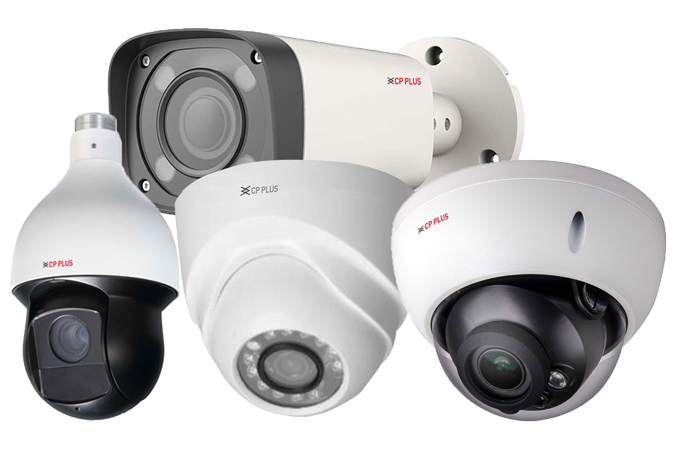
HTC Connection offers several styles of network security cameras. The appropriate camera depends on where it will be installed and what the business needs to monitor.

Dome Cameras
Dome cameras have a compact, discreet design that works well in offices, retail stores, reception areas, hallways, and other indoor commercial spaces. Certain models can also be used outdoors.
Their enclosed shape makes it less obvious which direction the camera is facing and may provide additional protection from accidental contact or tampering.

Bullet Cameras
Bullet cameras have a more visible, directional design and are commonly installed along building exteriors, parking areas, loading zones, entrances, and property perimeters.
Many outdoor bullet cameras include weather-resistant housings, infrared illumination, and long-range viewing capabilities.

Pan-Tilt-Zoom Cameras
Pan-tilt-zoom, or PTZ, cameras allow authorized users to adjust the camera’s direction and zoom level. They may be useful for monitoring large open areas where an operator needs flexible control over the camera’s field of view.

Varifocal Cameras
Varifocal cameras have adjustable lenses that allow the field of view and image focus to be configured for a specific area. They can be useful when a standard fixed lens does not provide the necessary viewing angle or level of detail.

Low-Light and Night-Vision Cameras
Low-light and infrared cameras are designed to capture usable footage when normal lighting is limited. Certain advanced cameras can also produce clearer or color images in challenging nighttime conditions.
The performance of any camera depends on the model, installation location, lighting, lens, and surrounding environment.

Indoor and Outdoor Security Cameras
Commercial properties often require a combination of indoor and outdoor cameras to achieve appropriate coverage.
Indoor and Outdoor Security Cameras
Commercial properties often require a combination of indoor and outdoor cameras to achieve appropriate coverage.
Outdoor cameras should be selected and installed with weather exposure, lighting, mounting height, viewing distance, and potential vandalism in mind.
Indoor Camera Coverage
- Reception areas
- Building entrances
- Hallways
- Retail sales floors
- Checkout areas
- Stockrooms
- Warehouses
- Loading areas
- Server rooms
- Equipment rooms
- Common areas
- Restricted spaces
Outdoor Camera Coverage
- Exterior entrances
- Parking lots
- Building perimeters
- Loading docks
- Delivery areas
- Gates
- Driveways
- Storage yards
- Outdoor equipment
- Emergency exits
Remote Camera Viewing
One of the primary advantages of an IP camera system is the ability to view authorized camera feeds remotely.
Depending on the system and configuration, business owners and managers may be able to access live or recorded video through:
- Smartphones
- Tablets
- Desktop computers
- Laptop computers
- Secure web interfaces
- Video management software

Video Recording and Storage Options
Commercial security camera systems require a plan for storing and managing video. The appropriate recording method depends on the number of cameras, video resolution, frame rate, desired retention period, and available network resources.
Higher-resolution video can provide greater image detail, but it may also require more bandwidth and storage capacity. HTC Connection can help you balance image quality, recording time, system performance, and budget.
Storage options may include:
- Network video recorders
- On-camera storage
- Local server storage
- Cloud-based storage
- Hybrid storage configurations

Network Video Recorders
A network video recorder, commonly called an NVR, receives and stores video from IP cameras connected to the network.
The recorder and storage capacity should be sized according to the number of cameras and the organization’s video retention requirements.
An NVR system may allow authorized users to:
- View live camera feeds
- Review recorded footage
- Search for video by date and time
- Export selected video clips
- Manage multiple cameras
- Configure recording schedules
- Adjust motion-based recording
- Monitor system and storage status

Smart Video Analytics and Motion Detection
Modern IP camera systems may offer intelligent features that help businesses identify relevant activity more efficiently.
These features can help reduce unnecessary alerts and make recorded footage easier to review. However, analytics should be selected and configured based on the environment because lighting, movement, weather, and other conditions can affect performance.
Available features vary by camera and may include:
- Motion detection
- Human detection
- Vehicle detection
- Line-crossing alerts
- Intrusion-area alerts
- Loitering detection
- Object removal detection
- Smart video search
- Real-time notifications

Power over Ethernet Camera Installation
Many IP cameras support Power over Ethernet, or PoE. This technology allows power and network data to travel through a single Ethernet cable.
PoE can simplify installation by reducing the need for a separate electrical connection at each camera location.
A typical PoE camera system may include:
- IP cameras
- Cat6 or other compatible network cabling
- PoE network switches
- Network video recorder
- Data storage
- Router or firewall connection
- Remote viewing software
Security Camera Cabling and Network Infrastructure
Even the most advanced IP camera depends on reliable cabling and network connectivity. Poorly installed cables, insufficient network capacity, or an improperly configured switch can affect video quality and system reliability.
For new construction or major renovations, we can plan camera locations and cable pathways before walls and ceilings are completed.
Our supporting infrastructure services include:
- Camera cable installation
- Cat6 and fiber-optic cabling
- PoE switch installation
- Network rack and cabinet organization
- Patch panel installation
- Camera cable testing
- Cable labeling and documentation
- Network troubleshooting
- Wireless network integration
- Equipment room organization

Upgrading an Existing Camera System
Older surveillance systems may provide limited image quality, difficult playback, insufficient storage, or no convenient remote access. HTC Connection can evaluate your existing equipment and recommend an appropriate upgrade strategy.
Our team will determine which existing components may still be useful and which should be replaced.
Depending on the current infrastructure, an upgrade may involve:
- Replacing outdated cameras
- Improving video resolution
- Adding cameras to uncovered areas
- Upgrading the recording equipment
- Expanding storage capacity
- Installing new network cabling
- Improving remote viewing
- Reorganizing camera connections
- Replacing damaged equipment
- Integrating old and new components when compatible
IP Cameras for Multiple Business Locations
Organizations with more than one property may benefit from a centralized video surveillance solution. A properly configured system can allow authorized users to access cameras from multiple sites through a single interface.
HTC Connection can help plan consistent camera coverage, recording, and remote access across multiple locations.
Multi-location camera systems may be useful for:
- Retail chains
- Medical practices
- Corporate offices
- Warehouses
- Property management companies
- Schools
- Restaurants
- Franchise businesses
- Commercial campuses
Businesses and Facilities We Serve
Each system is planned according to the facility’s layout, operations, image requirements, and monitoring goals.
- Hotels
- Restaurants
- Banks and financial offices
- Parking facilities
- Commercial properties
- Multi-tenant buildings
- Construction sites
- Data centers
Our commercial IP camera systems can be designed for:
- Corporate offices
- Retail stores
- Warehouses
- Distribution centers
- Industrial facilities
- Medical offices
- Educational facilities
- Government buildings